Introduction
In today’s rapidly growing digital world, businesses and individuals need flexible, reliable, and cost-effective computing solutions. Traditional physical computers and servers often require high investment, maintenance, and space. This is where the concept of a Virtual Machine becomes important.
A Virtual Machine (VM) is one of the most powerful technologies in modern computing. It allows users to create a digital version of a physical computer that can run its own operating system, applications, and services. Virtual machines help organizations improve efficiency, reduce hardware costs, increase security, and manage resources more effectively.
From cloud computing platforms to software development environments, virtual machines are used everywhere. Companies use them to host websites, store applications, test software, run different operating systems, and create secure computing environments.
This complete guide explains what a virtual machine is, how it works, its different types, advantages, disadvantages, applications, and its importance in modern technology.
What Is a Virtual Machine?
A Virtual Machine is a software-based computer system that works like a physical computer. It uses virtualization technology to create a virtual environment where users can install and operate an operating system and applications.
Unlike a traditional computer that depends on physical hardware, a virtual machine shares resources from a host computer. These resources may include:
- CPU power
- Memory (RAM)
- Storage space
- Network connections
A virtual machine behaves like a real computer because it has its own virtual hardware components. Users can install Windows, Linux, or other operating systems inside a VM without affecting the main operating system of the physical machine.
For example, a person using a Windows computer can create a virtual machine and install Linux inside it. Both systems can run at the same time on the same physical device.
How Does a Virtual Machine Work?
Virtual machines work through a technology called virtualization. Virtualization allows one physical computer to operate as multiple independent computers.
The main component responsible for creating and managing virtual machines is called a hypervisor.
What Is a Hypervisor?
A hypervisor is software that manages virtual machines and connects them with physical hardware resources.
The hypervisor controls:
- Processor allocation
- Memory distribution
- Storage management
- Network communication
There are two major types of hypervisors:
Type 1 Hypervisor
A Type 1 hypervisor runs directly on physical hardware without requiring a traditional operating system.
It is commonly used in:
- Data centers
- Enterprise servers
- Cloud computing environments
Examples include enterprise virtualization platforms used by large organizations.
Type 2 Hypervisor
A Type 2 hypervisor runs on top of an existing operating system.
It is commonly used by:
- Developers
- Students
- Individual users
It allows users to create virtual machines on personal computers.
Components of a Virtual Machine
A virtual machine contains several important components that allow it to operate like a real computer.
1. Virtual CPU
A virtual CPU provides processing power to the virtual machine. The hypervisor assigns physical CPU resources to different virtual machines based on requirements.
2. Virtual Memory
Virtual memory works like the RAM of a physical computer. It stores temporary data needed by the operating system and applications.
3. Virtual Storage
Virtual storage provides space for installing operating systems, saving files, and storing applications.
4. Virtual Network Interface
A virtual network interface allows the virtual machine to connect with networks and communicate with other devices.
5. Guest Operating System
The operating system installed inside a virtual machine is called the guest operating system.
Examples include:
- Windows
- Linux distributions
- macOS
Why Are Virtual Machines Important?
Virtual machines have become an essential part of modern computing because they provide flexibility and efficiency.
Businesses no longer need separate physical servers for every application. Instead, they can create multiple virtual machines on a single powerful server.
This helps organizations:
- Reduce hardware expenses
- Save energy
- Improve resource management
- Increase security
- Simplify IT operations
Virtual machines are also a foundation of cloud computing because many cloud services use virtualization technology to provide computing resources to users.
Benefits of Using Virtual Machines
1. Cost Reduction
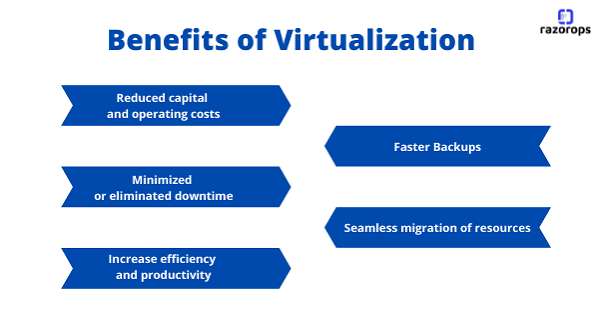
One of the biggest advantages of virtual machines is cost savings. Companies can run multiple virtual servers on one physical server, reducing the need to purchase expensive hardware.
This lowers:
- Equipment costs
- Maintenance expenses
- Electricity usage
- Data center requirements
2. Better Resource Utilization
Physical servers often remain underused. Virtual machines allow organizations to use available resources more efficiently.
A single server can host multiple virtual machines, and each VM can perform different tasks.
3. Improved Security
Virtual machines provide isolation between different environments. If one virtual machine experiences a problem, other virtual machines can continue running normally.
This makes VMs useful for:
- Security testing
- Malware analysis
- Application development
4. Easy Backup and Recovery
Virtual machines can be copied, backed up, and restored more easily than physical computers.
Organizations can quickly recover systems after failures by restoring virtual machine images.
5. Software Testing
Developers use virtual machines to test applications in different environments without affecting their main systems.
For example, developers can test software on multiple operating systems using separate virtual machines.
Types of Virtual Machines
There are different types of virtual machines based on their purpose and usage.
System Virtual Machine
A system virtual machine provides a complete virtual computer environment. It allows users to run a complete operating system.
Examples:
- Running Linux on a Windows computer
- Running multiple servers on one physical machine
Process Virtual Machine
A process virtual machine is designed to run a single application or process.
Examples:
- Programming language environments
- Application execution platforms
Virtual Machines and Cloud Computing
Virtual machines play a major role in cloud computing. Cloud providers use virtualization to deliver computing resources to customers.
Instead of buying physical servers, businesses can rent virtual machines from cloud platforms.
Cloud-based virtual machines provide:
- Flexible resource scaling
- Remote access
- High availability
- Faster deployment
Companies use cloud virtual machines for:
- Website hosting
- Database management
- Application development
- Data processing
Frequently Asked Questions (FAQs) About Virtual Machine
1. What is a Virtual Machine?
A Virtual Machine (VM) is a software-based computer that works like a physical computer. It allows users to run an operating system and applications inside a virtual environment using the resources of a real computer.
2. How does a Virtual Machine work?
A Virtual Machine works through virtualization technology. A software layer called a hypervisor creates and manages virtual environments by sharing the physical computer’s CPU, memory, storage, and network resources with different virtual machines.
3. What are the main benefits of using a Virtual Machine?
The main benefits of a Virtual Machine include cost savings, better resource utilization, improved security, easy backup and recovery, and the ability to run multiple operating systems on one physical device.
4. What is the difference between a Virtual Machine and a physical computer?
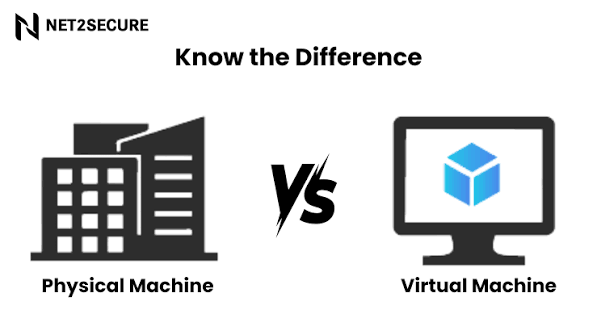
A physical computer depends on actual hardware components, while a Virtual Machine is a software-based system that uses virtual hardware created by a hypervisor. Multiple virtual machines can run on a single physical computer.
5. What is a hypervisor in Virtual Machine technology?
A hypervisor is software that creates and manages Virtual Machines. It controls the allocation of hardware resources such as CPU, RAM, storage, and network connections between the host system and virtual machines.
6. Can I run multiple operating systems using a Virtual Machine?
Yes, a Virtual Machine allows users to run multiple operating systems on the same physical device. For example, a user can run Linux inside a Windows computer without replacing the original operating system.
7. Are Virtual Machines secure?
Virtual Machines provide strong security because each virtual environment is isolated from others. They are commonly used for security testing, software development, and running applications in separate environments.
8. What are the common uses of Virtual Machines?
Virtual Machines are used for cloud computing, software testing, server hosting, application development, cybersecurity testing, data management, and running different operating systems.
9. What is the difference between a Virtual Machine and cloud computing?
A Virtual Machine is a virtual computer created using virtualization technology, while cloud computing provides computing services over the internet. Cloud platforms often use Virtual Machines to deliver flexible computing resources to users.
10. Are Virtual Machines expensive to use?
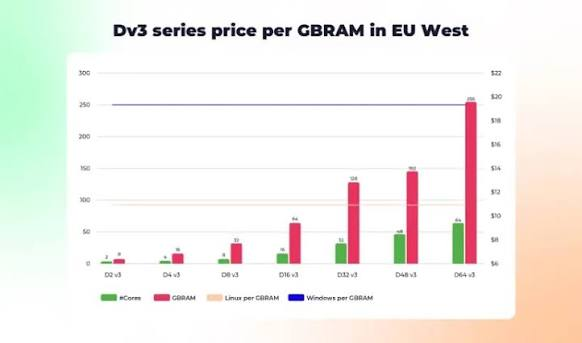
The cost of using Virtual Machines depends on the platform and resources required. Many organizations save money by using Virtual Machines because they reduce the need for multiple physical computers and servers.
Conclusion
Virtual Machine technology has changed the way individuals and businesses manage computing resources. It provides a flexible, secure, and cost-effective solution by allowing multiple operating systems and applications to run on a single physical device. Virtual Machines help organizations reduce hardware costs, improve performance, and simplify IT management. They are widely used in cloud computing, software development, testing, and data management. As technology continues to grow, the demand for Virtual Machines will increase because they offer better scalability, reliability, and efficiency. Virtual Machines will remain an important part of modern digital infrastructure and future computing solutions.